Teddy Doodle: A Playful Handwritten Font for Real Life
If you've ever wished your digital notes looked like they were jotted down with a favorite pen—warm, expressive, and full of personality—you’ll love Teddy Doodle. It’s not just another script font. It’s a carefully crafted doodle-style typeface that feels spontaneous and friendly, yet remains highly legible and versatile across devices and platforms.
What Makes Teddy Doodle Stand Out?
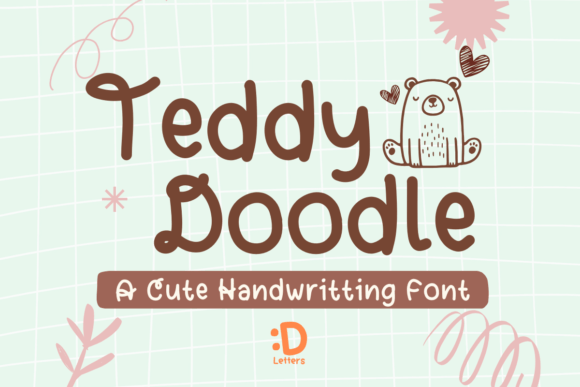
Teddy Doodle is designed to mimic the charm of hand-drawn lettering—slight variations in stroke weight, gentle curves, and subtle imperfections that give it authenticity. Unlike overly formal scripts or rigid sans-serifs, this font invites connection. Its lowercase letters have soft loops and open counters; capitals carry a light bounce. Even at small sizes—like in digital planner headers or blog sidebar text—it stays clear and approachable.
Because it’s built for digital use first, Teddy Doodle works beautifully in apps like Procreate, Notability, GoodNotes, and Canva. No awkward kerning fixes or missing glyphs. It includes standard Latin characters, numerals, punctuation, and common accented letters—so it’s ready for everyday English use, plus many European languages.
Why People Choose Teddy Doodle (and When It Fits Best)
Many creators reach for Teddy Doodle when they want to soften a design without losing clarity. Think of it as the visual equivalent of speaking warmly instead of reading aloud from a script. That makes it especially helpful for:
- Educators building engaging slide decks or printable classroom resources—students respond better to friendly, human-like typography.
- Small business owners crafting Instagram stories or email newsletters where tone matters as much as content.
- Bloggers and writers adding personality to headings, pull quotes, or callout boxes—without overwhelming the main body text.
- Freelancers and designers developing cohesive brand kits for clients who value approachability over formality.
- Hobbyists and planners personalizing digital notebooks or habit trackers with a consistent, joyful aesthetic.
It’s also a go-to for anyone tired of sterile, AI-generated visuals. Teddy Doodle brings back intention and tactility—even on screen.
Real-World Uses You Can Try Today
You don’t need design experience to get started. Here are practical, low-effort ways to bring Teddy Doodle into your workflow:
- Digital note-taking: Set Teddy Doodle as your default heading font in GoodNotes or OneNote. Use it for section titles, key takeaways, or daily affirmations—it turns routine notes into something you look forward to opening.
- Procreate lettering projects: Pair it with textured brushes to add depth to quote graphics or mood boards. Its natural rhythm makes spacing feel intuitive—not forced.
- Greeting cards and invitations: Layer Teddy Doodle over soft watercolor backgrounds for baby showers, birthdays, or thank-you notes. Its warmth reinforces sincerity.
- Branding accents: Use it sparingly—for taglines, social bios, or button labels—alongside a clean sans-serif. This contrast adds charm without sacrificing professionalism.
- Photo album captions: Add short, handwritten-style descriptions directly onto travel or family photos in Lightroom or Photoshop. It gives your memories an intimate, journal-like feel.
Things to Keep in Mind Before You Use It
Teddy Doodle shines brightest when used thoughtfully—not everywhere at once. Because it’s a display font by nature, it’s best suited for headlines, short phrases, and decorative elements. For long paragraphs or body copy, pair it with a simple, readable font like Inter, Lato, or even system defaults like San Francisco or Segoe UI.
Also consider context. While its playful energy works wonderfully for lifestyle brands or creative portfolios, it may not suit legal documents, technical manuals, or corporate annual reports—unless used intentionally for contrast (e.g., a fun subheading in an otherwise formal layout).
And remember: licensing matters. Teddy Doodle is typically offered under personal and commercial licenses. If you’re using it for client work, merchandise, or digital products you plan to sell, double-check the license terms. Most reputable sellers include clear usage guidelines—and many offer extended licenses for broader applications like app interfaces or SaaS platforms.
A Friendly Note for Beginners
If you're new to fonts or digital design, start small. Try Teddy Doodle in one place first—maybe your weekly planner title or the “Welcome” banner on your blog homepage. See how it changes the mood. Does it feel more inviting? More relaxed? More *you*? That’s your cue to explore further.
You don’t need fancy tools either. Teddy Doodle works in free apps like Google Slides and Canva, as well as premium ones like Affinity Designer and Adobe Express. And because it’s lightweight and web-safe for most platforms, loading times stay quick—even on mobile.
More Than Just a Font—A Design Ally
Teddy Doodle fits naturally into modern digital life—not as a trend, but as a tool that supports how people actually create, communicate, and connect. Whether you're sketching ideas in Procreate, drafting a heartfelt message for a friend, designing a workshop handout, or launching a handmade goods shop online, this font helps your voice come through with honesty and heart.
Its appeal lies in balance: structured enough to be functional, loose enough to feel human. That’s rare—and valuable—in a world full of polished, impersonal visuals.
So if your goal is to make digital spaces feel more personal, more thoughtful, or simply more joyful to interact with, Teddy Doodle isn’t just an option. It’s a quiet invitation—to slow down, choose meaning over speed, and let your work reflect who you are.